Login Information for Qualtrics
1. Login to Qualtrics at http://sjsu.qualtrics.com
2. Please enter your SJSUOne Credentials
SJSU ID: 9 digit SJSU ID
Password: SJSUOne Password
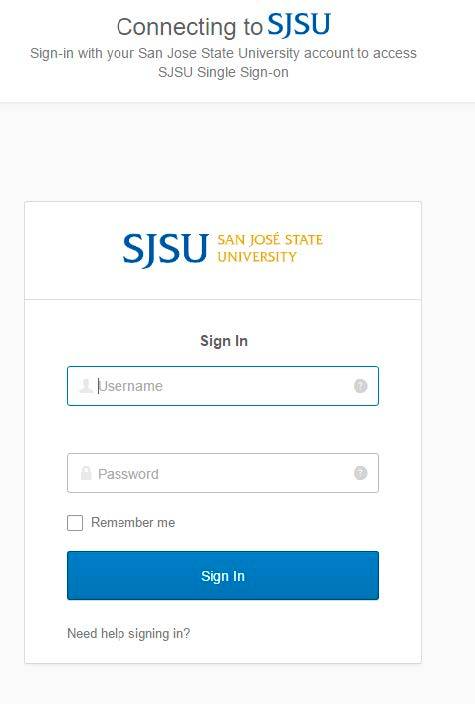
3. If you forgot your password, please click on the Need help signing in link. This
will provide two links: Forgot ID or Password? and Help.
Note: SJSUOne password expires every 180 days.
4. If you are a first time user or need more help, please click on the Help link and follow the instructions on the webpage.
Password Help and FAQs
First-Time User
Current User
Former/Open University Students
I am a first-time user
Open University Students: On the first day of late registration, we post an Open University Quick Admit login button on the MySJSU homepage. Click this login button to register and get a system generated ID and password.
Note: Activation of your SJSUOne account is optional.
New Matriculated Students and New Employees: As a first time user, you must create a password before you can log in. Accounts have been created for all current faculty, staff and students. Your SJSUOne account is automatically created and removed based on MySJSU records.
1. Go to SJSUOne Set/Reset Password.
2. Enter your 9-digit ID, and then follow the instructions to create a password.
How do I change my password?
First Time Users - Password Reset
Current Users - SJSU Account Management
Former/Open University Students - MySJSU Account Help
I know my password, but it stopped working.
Passwords expire every 180 days. If 180 days pass before you change your password, that password will expire and you will need to create a new password, as follows:
- Go to SJSUOne Account Management.
- Enter your 9-digit ID, and then follow the instructions to create a new password.
I am locked out of my account, what should I do?
Please wait 21 minutes for your account to reset.
I know my ID, but I forgot my password.
If you forget your password, you can get a password reset.
- Go to SJSUOne Set/Reset Password.
- Enter your 9-digit ID, and then follow the instructions to create a new password.
I don't remember my ID
If you forgot your ID, you can look it up. NOTE! Your account MUST be current.
- Go to SJSUOne ID Lookup
- Enter your last name, the last four digits of your Social Security number, and your birthdate.
If it has been more than a year since your last semester, you will need to submit a help request with the SJSUOne Account Help.
I still need help with my ID and/or password
Alumni: If it has been more than one year since the end of your last semester, you will not be able to reset your password. Instead, submit a SJSUOne Account Help.
Current Students and Employees: For assistance with your ID and/or password, please complete the SJSUOne Account Help.
